

USPS Postcard Design Requirements for First-Class Rates
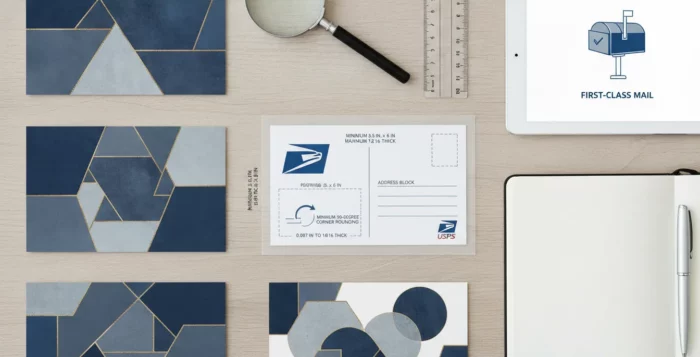
A real estate postcard needs to do two jobs: catch a homeowner’s eye and meet postal rules. A design that looks polished on screen may still miss the requirements for size, thickness, shape, or address placement. That can affect postage or delay a mailing, especially when you’re reaching an entire neighborhood. Understanding the usps postcard design requirements before you order prints helps you plan the layout, choose suitable materials, and check the finished piece. This guide explains what to review, from dimensions and paper stock to clear address and postage areas, so you can prepare your next campaign with fewer last-minute surprises.
Key Takeaways
- Verify the completed card before printing: Check its size, thickness, proportions, shape, and weight, since each can affect its mailing category and postage.
- Design the mailing side for easy processing: Keep the address, postage, and barcode areas clear, and review a full-size proof for readability.
- Match the design to your mailing method: Confirm current USPS requirements for First-Class Mail or EDDM, then tailor the message and recipient list to your campaign.
What Qualifies for USPS First-Class Postcard Rates?
A postcard must meet USPS requirements for size, thickness, proportions, and shape to qualify for the First-Class Mail postcard price. If it falls outside even one of those limits, it may be charged at the letter rate. Check the finished piece before printing, especially when you’re planning a neighborhood mailing where postage costs can add up.
How postcard and letter rates differ
USPS sets separate prices for postcards and letters. The postcard price applies only to cards that meet the required dimensions and other mailing standards. A flat piece of paper with a postcard-style design does not automatically qualify, and a card that is too large or too thick may be priced as a letter.
Before approving a print run, compare your design with the USPS postcard standards. If your card falls outside the postcard limits, confirm the correct mailing category and postage for the finished piece.
Why size alone doesn’t qualify a card
A card can meet the height and length limits but still miss the requirements for thickness or proportions. USPS measures length parallel to the address and height perpendicular to it. To qualify for postcard pricing, the length-to-height ratio must be between 1.3 and 2.5, and the card must be at least 0.007 inch thick.
Measure the finished card, not just the design file. Trimming and printing can affect its final dimensions. Check the USPS size and thickness requirements before choosing paper stock or approving custom dimensions.
How shape, flexibility, and machinability affect processing
A qualifying postcard must be rectangular, with square or slightly rounded corners, and sturdy enough to move through postal equipment. An unusual shape or rigid construction can affect how USPS classifies and processes the piece, so confirm requirements before printing a specialty design.
Keep the address side clear and easy to read. Leave the bottom 5/8 inch free of text and graphics for barcode processing, and keep postage and delivery details unobstructed. When planning real estate postcard campaigns, reserve space for mailing information first, then fit your property image and message around it.
What Are USPS Postcard Size Requirements?
A postcard’s dimensions help determine whether it qualifies for the First-Class Mail postcard price. The card must also meet USPS requirements for shape, thickness, and proportions. Check the finished piece before printing, since trimming or added materials can affect its measurements. These details matter when planning a real estate mailing through a service such as ProspectsPLUS! postcard campaigns.
Minimum and maximum dimensions
To qualify for the First-Class Mail postcard price, a card must be rectangular and measure at least 3½ inches high by 5 inches long. The maximum dimensions are 4¼ inches high by 6 inches long. The card must also be at least 0.007 inch thick and no more than 0.016 inch thick.
These limits apply to the finished postcard, not just the artwork. A card that falls outside any one of them may not qualify for the postcard price, even if it looks like a standard postcard. Check the USPS postcard size standards before selecting a format or approving a print run. Confirming the dimensions early can help you avoid unexpected postage costs.
Measure the finished card
Measure the postcard after it has been printed and trimmed. USPS defines the length as the dimension parallel to the delivery address, and the height as the dimension perpendicular to it. So, the way you position the address determines which side counts as the length.
Check the actual card rather than relying only on the measurements in your design software. A small difference after trimming can affect whether the piece falls within the permitted range. If the card includes a coating or another material that adds thickness, account for that, too. For a large mailing, ask your printer to measure a finished sample before producing the full order. This gives you a chance to confirm the card’s dimensions and thickness before postage is calculated.
Meet shape and aspect-ratio rules
A postcard must be rectangular to qualify for the postcard price. USPS also requires a length-to-height ratio of at least 1.3 and no more than 2.5. In practical terms, the card cannot be too close to square or excessively long and narrow.
Check the proportions as well as the overall dimensions when planning a custom design. For example, a square card might fit within the maximum height and length but still fail the ratio requirement. The USPS size guidelines cover the ratio alongside the size limits. If you’re unsure whether a custom shape or layout qualifies, confirm it with your printer or USPS before sending the design to production.
When oversized cards pay letter rates
A postcard larger than 4¼ inches high by 6 inches long generally won’t qualify for the First-Class Mail postcard price. If it fits within letter-size limits, USPS will typically price it as a letter instead. Letter-size pieces can measure up to 6⅛ inches high by 11½ inches long, though other requirements also apply.
That means a larger real estate mailer may still be mailable, but its postage can differ from the postcard rate. If the card exceeds letter-size limits, another mail category may apply. Check the finished dimensions and intended mailing class before printing, and confirm the applicable rate with USPS or your mailing provider.
What Thickness and Weight Meet USPS Rules?
The right paper stock helps your postcard hold up in the mail, but thickness and weight also affect postage. Check the finished piece, not just the paper specification, before approving a print run. Coatings, inserts, or attachments can change its measurements and mailing category.
Choose the right thickness and paper stock
Choose sturdy cardstock instead of standard copy paper. To qualify for USPS postcard pricing, a card generally needs to be 0.007 to 0.016 inches thick and meet the postcard size limits. Larger cards may be treated as letters, with different requirements and postage. Review the USPS postcard specifications before choosing stock, particularly if you’re planning an oversized real estate mailer.
Ask your printer to confirm the thickness of the completed card. Paper coatings and production choices can affect the final measurement. If you’re unsure, request a printed sample and measure it before ordering postcards for a neighborhood campaign.
Meet postcard weight limits
Thickness and weight are separate checks. A postcard must meet the applicable size and thickness rules, while its weight helps determine the postage due. Heavier pieces, or cards that fall outside postcard specifications, may require a different rate. Since postage depends on the mailpiece and mailing class, weigh a finished sample rather than relying only on the paper manufacturer’s estimate.
Before printing a large campaign, check the current USPS postage prices for the service you plan to use. Confirming the rate early helps you set a realistic mailing budget and avoid discovering that your cards need additional postage after they’re printed.
Avoid flimsy, rigid, or bulky cards
A card that bends too easily may be damaged during processing, while one that is unusually rigid or bulky may not qualify for postcard pricing. Keep the piece flat and evenly constructed. Stickers, magnets, raised lettering, and other attachments can affect its thickness or shape, so check with your printer or USPS before including them.
Test a completed sample if you’re using a special finish or adding anything to the card. A clear property photo and a concise message can help a real estate postcard stand out without extra materials that could alter its mailing requirements. Once your sample is ready, verify its dimensions, thickness, and weight before approving the full order.
How Should You Design the Address Side?
Treat the address side as a practical part of your real estate postcard, not extra space for promotional copy. A clean layout helps recipients find the mailing details and helps postal equipment process the card. Before you print, reserve areas for the delivery address, return address, and postage, then check the proof at its actual size. The exact layout can depend on your mail class and mailing method, so confirm details with your printer or mail provider.
Place the delivery address for easy reading
Place the recipient’s address in a clear, consistent area, typically on the right side of the card. Set each line horizontally and use the standard order: recipient name, street address, city, state, and ZIP Code. Leave open space around the address so it stands apart from nearby text and artwork.
For a real estate campaign, use the other side of the card, or the available message area, for your listing photo, neighborhood message, and call to action. Avoid squeezing extra copy beside the address. WriteToMail’s postcard layout guidance describes the common division between the address area and message area. Ask your printer to confirm the placement for your specific mailing format.
Leave room for postage and the return address
Plan for postage and your return address before adding design elements. Keep both separate from the recipient’s address, and leave the postage area clear for a stamp, indicia, or other approved marking. If you use a printed postage mark, ask your printer or mailing provider where it belongs and how much space to reserve.
A well-organized mail panel makes the card easier to read and gives postal marks room to print clearly. Review the proof at full size, since details that look small on screen may take up more space on the finished card. Sendvo’s postcard design guidance offers additional advice on keeping postal details legible and free from decorative elements.
Keep graphics clear of address and barcode areas
Keep photos, logos, borders, colored panels, and background patterns away from the address and any area reserved for postal barcodes. A plain, light background behind the delivery address helps each character remain distinct. Even subtle textures or a busy image can make that information harder to read.
Check the full address side for small design details that might extend into the mail panel, including icons and decorative lines. If your printer provides a template, use it to identify areas that should remain clear. WriteToMail’s layout advice explains why a clear zone around the address can help postal equipment process a postcard.
Use readable type, strong contrast, and a clean layout
Choose a simple font for the address and print it in a dark color on a light, solid background. Avoid decorative lettering, small type, and low-contrast combinations such as light gray on white. The address should be easy to read at a glance, whether a recipient is looking at the card or it’s being processed by postal equipment.
Keep promotional elements secondary on the address side. If you include a brief message or brand mark, make sure it doesn’t crowd postal details. Check a printed proof rather than relying only on your monitor, since print can affect sharpness and contrast. CRST’s postcard printing guidance covers print quality considerations, including image resolution.
Add mailing marks only when needed, such as EDDM indicia
Use postal markings that match your mailing method. Every Door Direct Mail (EDDM) campaigns use specific indicia and preparation procedures, and generally don’t use individually addressed mailpieces. A First-Class postcard sent to named recipients follows a different process, so don’t add EDDM markings unless you’re mailing through that service.
Before sending a design to print, confirm the mailing class and preparation method with your printer or mail provider. They can check that the indicia, address format, and other postal details fit your campaign. Wise Pelican’s EDDM overview explains how EDDM markings differ from those used for individually addressed mail.
Can Materials, Coatings, or Attachments Affect Postage?
Yes. A postcard’s materials and finish can affect its thickness, flexibility, shape, and ability to move through USPS processing equipment. Those details may change its mailing classification or postage. Check the completed piece, including any attachments, before printing a full campaign.
Choose readable, mail-friendly finishes
Coatings can protect a postcard and help colors look vivid, but the address side must remain clear and easy to read. Keep the delivery address, postage area, and required mail markings free of graphics or finishes that make printed details difficult to see. If a coating creates glare, check the card under ordinary lighting before approving the design.
Use sharp property or neighborhood photos so details reproduce clearly in print. The USPS postcard design guide recommends preparing images at 300 DPI. Review a physical proof to make sure the coating doesn’t obscure small text or reduce contrast.
Check how stickers, magnets, and attachments affect thickness and shape
A sticker, magnet, or other attached item can change a postcard’s thickness, weight, surface, and shape. That may affect whether it qualifies for a postcard price or can pass through postal equipment as designed. USPS outlines the physical requirements for postcard sizes and prices.
If you’re considering an attached coupon, magnet, or promotional item, ask your printer to assess the completed piece before finalizing the design. Don’t check only the postcard’s base dimensions: an attachment may change the finished measurements or make the card uneven. Confirm the mailing class and postage for the assembled postcard.
Avoid protrusions that make cards nonmachinable
Raised decorations or attachments can create uneven edges, change the shape, or make a postcard too rigid for standard processing. These features may affect postage or whether the piece can be mailed as designed.
Keep the address side uncluttered, especially around the address, postage, and barcode areas. To give a postcard personality without adding protrusions, use a strong listing photo, a clear neighborhood message, or a distinctive printed design. Before placing a large order, ask your printer to check that the assembled postcard lies flat and has even edges. USPS requirements can vary based on the finished piece, so confirm the mailing details before approving the print run.
Check unusual materials with your printer or USPS
If your design uses specialty paper, layered construction, an unusual coating, or an attachment, request a mailing review before printing. Share the finished dimensions, thickness, and weight, and provide a physical sample when possible. Your printer can assess the production details, while USPS can help confirm applicable mailing requirements.
This step is especially useful for real estate campaigns that include magnets or other keepsakes. A design that appears ready to mail may need a different rate or preparation once assembled. ProspectsPLUS! offers real estate postcard campaigns, and a direct mail provider can help review your finished piece before a large mailing goes to print.
How Can Real Estate Postcards Stand Out and Meet USPS Rules?
A strong real estate postcard gets noticed without making its postal details hard to read. Plan the marketing message and the mailing side together: use the front to earn attention, and keep the delivery address, postage, and any required processing areas clear. Before printing, check that the finished design follows the rules for your chosen mailing class.
Lead with a strong property or neighborhood image
Choose a sharp, high-resolution photo that feels familiar to the people receiving your postcard. A well-presented listing, a neighborhood street, or a recognizable local landmark can make your message feel relevant. Use an image that supports the headline, rather than adding visual clutter or competing with the main point.
Keep the marketing image and copy clear of the address and postage areas. On the mailing side, leave enough open space for postal details and avoid placing decorative elements where they could make the address harder to read. Review a print proof at actual size to catch layout issues before placing an order.
For ideas and formats suited to real estate marketing, browse ProspectsPLUS! postcard campaigns. The right image can draw a homeowner in, while a clean layout keeps the card practical to mail.
Make the offer and call to action easy to find
Give recipients one clear next step. Invite them to request a home valuation, view a listing, or call to discuss a move. Use a short headline, concise supporting copy, and readable type so the offer makes sense at a glance. Avoid adding several competing calls to action.
Make sure the offer matches the destination. If you invite homeowners to request a valuation, for example, the QR code or web address should take them directly to a page where they can do that. GrowMail’s postcard design tips also recommend keeping the message concise and making the call to action obvious.
Before approving the design, check that the call to action stands out without crowding the address, postage, or other postal details.
Tailor concise messages to your audience and mailing list
Focus each postcard on what matters to the people receiving it. For a neighborhood campaign, you might mention a recent nearby sale. For homeowners who may be considering a move, you could offer a home value review. Tailor the image, headline, and offer to the audience instead of sending the same generic message to every list.
Choose recipients with your campaign goal in mind. You can use geography and other appropriate audience criteria to reach the households most relevant to your message. ProspectsPLUS! offers mailing lists and Listing Lens AI to help agents identify audiences for real estate campaigns.
Postcards have limited room, so make each word count. Every Door Direct Mail’s guidance for real estate postcards recommends concise copy. A focused message is easier to scan and leaves space for a readable design.
Track responses without crowding postal details
Use a campaign-specific QR code, short web address, phone number, or promo code to learn which postcards prompt a response. Give each audience or campaign its own tracking method, so you can compare results and see which message is working best.
Place tracking details on the marketing side of the card, away from the delivery address, postage, and barcode areas. Keep the address side uncluttered so postal information stays easy to find and read. This is especially important when adding graphics or decorative elements. A real estate postcard design guide recommends preserving the mail panel and keeping design elements clear of processing areas.
Before printing, scan both sides of the proof at actual size. Test QR codes and web addresses, check that the tracking details are legible, and confirm they do not compete with the main call to action.
Include required brokerage, licensing, and advertising disclosures
Before approving a postcard, check your state’s real estate advertising rules and your brokerage’s requirements. Depending on the campaign and location, you may need to include your brokerage name, license information, or specific disclosures. Requirements vary, so don’t assume a postcard that worked before meets the rules for a new campaign.
Review claims about home values, recent sales, and the likelihood of a property selling. Keep statements accurate and supportable, and describe offers clearly. If you’re contacting recipients who may not expect your marketing, check whether solicitation language or another disclosure is required.
Make required information readable and keep it separate from postal details. Ask your broker or compliance contact to review the final proof when you’re unsure. A real estate postcard design guide also advises agents to check state and brokerage rules before sending prospecting offers or home value claims.
Which Design Mistakes Can Raise Postage or Cause Delays?
A postcard may look ready to print but still create problems during mailing. Size, materials, shape, and address placement can affect postage and how easily postal equipment processes the piece. Review these details before approving a real estate campaign, especially when you’re mailing to a large list.
Exceed size, thickness, or weight limits
USPS postcard pricing applies only when a card meets the requirements for that mailpiece category. If the finished card is too large, too thick, or too heavy, it may be priced as a letter or another type of mail. That can change postage, so check the final printed piece rather than relying only on the dimensions in your design file.
Paper stock, coatings, folds, and attachments can all affect thickness and weight. Ask your printer to verify the finished specifications before you place a full order. You can also check current USPS mailing standards for the requirements that apply to your mailing class.
Choose a nonrectangular shape or rigid construction
A nonrectangular postcard or one made from rigid material may be harder for postal equipment to handle than a standard rectangular card. Unusual shapes, uneven edges, and materials that do not bend as expected can affect machinability. Depending on the mailpiece and mailing class, that may mean extra postage or different processing.
A distinctive shape can help a real estate mailer stand out, but check the postal requirements before committing to it. Ask your printer or mailing provider to review a physical sample, especially if you’re using specialty stock or an unusual finish. USPS explains how a mailpiece’s physical features can affect processing and postage.
Cover the address, postage, or barcode area
Keep the address side clear so postal equipment can read and process it. Background patterns, images, text, or stickers that overlap the delivery address or postage area may make important details harder to read. Graphics can also interfere with space used for postal markings or barcodes.
Use your printer’s template to position the delivery address, return address, and postage. Leave any designated barcode area unobstructed, and check the address side closely when you review the final proof. USPS offers mailpiece design guidance to help you plan a layout that supports mail processing.
Assume dimensions alone qualify your card
Meeting the size requirements does not automatically qualify a card for postcard pricing. Shape, thickness, weight, and other physical features also matter. For example, a card may fall within the allowed length and height but still be too rigid or thick for the mailing category you planned to use.
Check the requirements for your specific mailing class before you finalize the design. If you’re using a special paper stock, coating, or attachment, ask your printer or mailing provider to assess a finished sample. Reviewing the full piece, not just its dimensions, can help you spot potential issues before printing and mailing a real estate campaign.
Confuse First-Class postcard rules with EDDM preparation rules
First-Class Mail postcards and Every Door Direct Mail (EDDM) are prepared differently. First-Class postcards are individually addressed. EDDM pieces are prepared for delivery along selected carrier routes and use specific postal markings instead of individual recipient addresses.
Decide how you’ll mail the campaign before designing the address side. EDDM has its own requirements for markings and preparation, so a First-Class design may not be ready simply by removing the recipient addresses. Review the current USPS EDDM requirements, then confirm the mailing details with your printer or mailing provider.
How Can You Check a Postcard Before Printing?
Check finished dimensions, aspect ratio, thickness, and weight
Measure the finished card, not just the digital design. To qualify for USPS First-Class Mail postcard pricing, a card generally must be rectangular, 3.5 by 5 inches minimum and 4.25 by 6 inches maximum. Its thickness must be between 0.007 and 0.016 inches, and its length divided by its height must be between 1.3 and 2.5. If it falls outside these limits, it may be charged at a different rate.
Ask your printer to confirm the finished card’s thickness and weight. Paper stock, coatings, and other finishing choices can affect both, while a card that is unusually rigid may require different handling. Before approving a large mailing, compare the specifications with the USPS physical standards and confirm that your stock is suitable for the mailing class you plan to use.
Review the print proof, especially the address side
Review a print proof before approving production. Check both sides at actual size, paying close attention to the address side. Make sure the delivery address is easy to find and read, the postage area is clear, and the return address is included where required. Keep photos, logos, decorative elements, and colored blocks away from areas used for postal processing.
Look for typos, low-resolution images, awkwardly cropped photos, and text that is too small or difficult to read. Confirm that the approved design includes any required brokerage or advertising disclosures. If you’re printing several versions for different neighborhoods or offers, inspect each proof separately. ProspectsPLUS! offers customizable real estate postcard campaigns, and a careful proof review helps ensure each version is ready to print and mail.
Confirm current USPS standards, postage, and mailing class
Postage depends on more than a postcard’s dimensions. Mailing class, weight, shape, thickness, and preparation method can affect the rate and how the piece is processed. Check the latest USPS mailing standards before placing your order, and confirm the postage and mailing class with your printer or mail provider. This is especially important if your card uses specialty stock or finishes.
Also check whether your campaign uses standard First-Class Mail or Every Door Direct Mail (EDDM). EDDM has its own preparation and addressing requirements, so a postcard that meets one service’s rules may not meet the other’s. Confirm that your mailing list and preparation method match the service you select. Agents planning outreach to specific neighborhoods can explore ProspectsPLUS!’s targeted mailing lists as part of their campaign planning.
Use a preflight checklist for every real estate campaign
A short preflight checklist can catch production issues before they affect an entire mailing. Confirm the finished dimensions, aspect ratio, thickness, and weight. Review both sides of the print proof, check that the address and postage areas are clear, and verify the mailing class, postage, and any service-specific preparation instructions. Ask your printer or mail provider to review unusual materials, such as specialty coatings, attachments, or nonstandard stock.
Then check the message. Does the headline match the offer? Can homeowners understand the point quickly? Is the call to action easy to spot, and are required real estate disclosures included? Add a trackable URL or QR code if useful, but keep it clear of postal details. Applying the same checklist to listing announcements, neighborhood mailings, and other campaigns helps you produce consistent, polished postcards that are ready for printing and mailing.
Frequently Asked Questions
Can any postcard-sized design use the USPS First-Class postcard price?
No. The finished mailpiece must meet USPS rules for dimensions, thickness, shape, and proportions. A design that looks like a postcard may still be priced as a letter if it misses one of those requirements.
What should I measure before approving a print order?
Measure the completed card after printing and trimming. Check its height, length, thickness, and weight, and make sure it is rectangular and within the required length-to-height ratio. Ask your printer to verify a sample if you’re using specialty stock or finishes.
What happens if my postcard is larger than the postcard limits?
It may qualify for letter postage if it fits the letter-size requirements. If it exceeds those limits or has unusual physical features, a different mailing category or postage may apply. Confirm the classification and rate before printing.
Can I add a magnet, sticker, or special coating?
Possibly, but these additions can change the card’s thickness, weight, flexibility, or shape. Have your printer or mailing provider review the assembled piece and confirm its postage before you order a full campaign.
Does EDDM use the same postcard rules as individually addressed mail?
No. EDDM has separate preparation and addressing requirements. Choose your mailing method before finalizing the design, then confirm that the postcard, postal markings, and preparation match that service.